
How To Appear Invisible/Offline In Steam
Steam is your best friend if you are a PC gamer. It is an excellent way for organizing all your games. However, it also offers amazing sales, mods and DLC management. Do you want to be offline on Steam, whether you are new or a veteran player?
This and other cool tricks will be covered. These will help you make the most of your time on the gaming platform. Steam is primarily a gaming platform, but it also has a social component. However, it isn’t nearly as intrusive or annoying as Snapchat. Instead, you can use the social side to play with your friends and form co-op teams, raids, or any other type of game you want.
This tip sheet contains basic tips and tricks to help you use Steam. It is part of our Steam coverage. This tip sheet is for both new and returning Steam users. It provides some suggestions on how Steam can help you make your life easier.
How to appear Offline in Steam
You can play in complete privacy if you wish. Of course, you can play in privacy with your friends, but sometimes it is nice to be alone, indulge in a secret game, or just have some fun.
Steam usually shows you as online when you log in. This can be changed if you wish. You may need to go offline using either a Mac or a PC.
Open Steam and choose Friends from the top menu.
Choose Offline from the dropdown.
After Steam has received the update, you will now be offline to all your friends. This can take some time, especially during busy times, but it will eventually update.
There is no way to go offline.
Some users claim that there is no option to toggle between online and offline status. These troubleshooting tips will help you if you have difficulty changing your status.
Verify your internet connection. Turn off your wifi and then turn it back on to make sure you have strong connections.
Clear cache – Clear cache using your browser or app.
Logout and log back in – Click on the profile option, click the dropdown menu and click ‘Logout. Log in again.
You can check your internet settings by going to advanced settings and ensuring that “Enable Enhanced Protected Mod” is not checked.
If you have more issues you can visit the Steam Support page for more help.
Your Library can now include non-Steam Games.
Steam can be used to manage any other installed games. While it won’t work with all AAA games, most AAA games will work. You can use Steam to manage your games if another portal offers a sale or if you just want to play with friends.
Start Steam and choose Games from the top menu.
Select “Add a nonsteam game to my library.”
Choose the game you wish to add to Steam.
You can add the code to Steam to play a newly purchased game.
Start Steam and choose Games from the top menu.
Select “Activate a Product” to activate Steam.
Click Next to open the pop-up window. Then, agree to the T&Cs.
In the next window, add the serial code. Allow Steam to recognize this code.
You can download the game via Steam just like usual.
Save your Save Games
It turns out that Steam doesn’t back up all games. Some games don’t allow Steam backups, or they don’t work at all. So you save games may seem safe, but they might not be. You can backup your saved games as well.
Go to your Library by opening Steam.
Choose the game that you wish to backup.
Right-click to select Backup Game Files
In the pop-up box, enter the destination.
If you are a Windows user, you can use another hard drive or OneDrive. You can quickly rebuild your Library and save your games in the event of a disk failure.
Move steam to a different drive.
You can move your Steam installation to take advantage of the SSD’s extra speed if you just bought one. Although it isn’t always as simple as you might think, it can be done. While you can move your games individually, I find it easier to move the whole package.
Navigate to the Steam installation folder by exiting Steam
Copy the SteamApps folder and User Data folder to the new drive.
Remove Steam from the original drive.
Install a fresh copy of Steam on your new drive.
Copy the SteamApps folder and User Data folder to your new Steam installation folder.
Log in to Steam and start Steam.
You should see your games in your Library. Some games may need to be installed first, but they should work fine. Right-click a game to have problems. Click Properties and then select the Local Files tab. Select Verify the Integrity for Game Files.

What is ‘Void document Oncontextmenu null’? How to Re-Enable the Right Click
This tutorial will help you if you arrive on a website, find something you like and want to copy it, and then right-click. Many websites have made it a point to prevent right-clicking on their pages in order to stop copying or theft. Although there is a way to avoid this madness, it doesn’t work well for users. However, you can work around this problem by using JavaScript’s Void Document oncontextmenu Null.
There are several ways around the inability to right-clicking on web pages. Although I don’t condone copyright theft or copying entire pages, I support the possibility of taking quotes, code, or other snippets of pages for your purposes. It is a great help to save troubleshooting steps from other sources. However, not everyone is as educated as I am.

How to allow right click on blocked websites
The administrator may use HTML code or JavaScript to block the right-click context menu depending on the website. You have many options to circumvent this limitation. Using ‘void documentoncontextmenu null is one example. Here are a few examples.
You can copy and paste ‘void documentoncontextmenu null’ to a webpage if you are landed on it. Now you should be able to right-click as usual to do what you need. This is a must-have for every copy you make, but it works great on many pages.
This is not a universal method as website owners can use a variety of methods to prevent right-click. Try these other methods if that fails.
Save this page
I found the easiest way to bypass the right-click block was to save the entire page in HTML. Then, I can open the page in the browser and right-click, copy, and paste it. This is especially useful when I have multiple pieces or quotes of code. Although this works in most browsers, Edge users may need to save the page to HTML to ensure it runs properly. But it worked for me, and it may work for you.
JavaScript should be disabled completely.
This is a dangerous option, as it can cause web pages to be completely broken. JavaScript is used to prevent right-click dialogues from being blocked by websites. You can disable JavaScript to stop it from interfering with your work. The browser you use will determine how you do this.
In Firefox:
Type ‘about’ in a new tab.
JavaScript is available for download.
Double-click ‘javascript. It is enabled to make it false rather than true.
In:
Click the three-dot icon at the top of the screen and choose Settings.
Choose Advanced and Content Settings in Privacy and Security.
Toggle JavaScript to off
JavaScript may be disabled on some websites to prevent them from functioning correctly or from working at all. This setting should only be used if absolutely necessary.
Use a browser plugin.
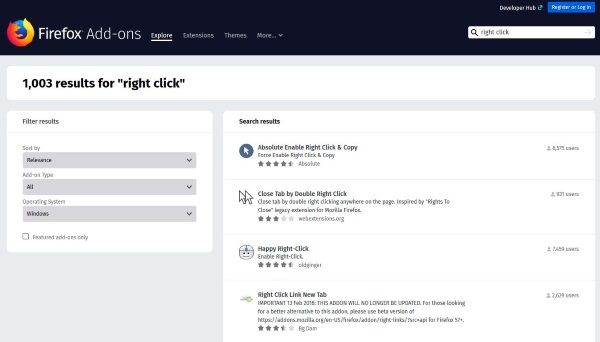
The use of plugins to enable the right-click dialogue is more effective than simply disabling JavaScript. There are many plugins available for Chrome and Firefox, and some work well. Look in your default browser plugin section to find ‘right click’ words or phrases, and you’ll be amazed at the results.
Firefox Quantum is my favourite browser. Over a thousand results were returned for the ‘right click’ keyword. While some of the results are not relevant, I found the best plugins that were exactly what I needed. No matter what browser you use, you should see the same plugins.
Go to the source
You may find it easier to see the source code if you will only need to copy something from pages. Although adding “void document oncontextmenu NULL” to the URL bar takes less effort, it is not always convenient to have the code available. So it’s worth remembering Ctrl+U.
Right-click on the page you wish to open and hit Ctrl+ U. The source code will be displayed in a new tab. To search the source code of the text, you can use Ctrl+ F to locate it. The text should now be easy to copy. Ctrl + U or Ctrl + F should work with all modern browsers.
You should not use the ability to right-click and copy text from web pages. Use it sparingly and only when necessary. It takes a lot of effort and time to create content that you will enjoy. Would you please copy responsibly?
Ohio Approves 3 existing Conditions for Marijuana cancer Treatment
Ohio officially became the 25th State that legalizes medical marijuana. Today after a two-year rollout process, people can access medical marijuana in the whole State.
Like other states with medical marijuana conditions, Ohio has confirmed cancer as one of the qualifying medical marijuana Ohio conditions for treatment with marijuana.
According to the National cancer institute, there are approximately 15 million Americans now living with cancer. And around 70,000 new cancer cases are made each year in the State of Ohio.
We have available evidence. But some limited confirmed that cannabis is the most powerful and appropriate medicine for people living with cancer and treatment-related side effects.
Read on to know more about conditions for medical marijuana in cancer treatment.
How Medical Marijuana Interacts With the Body
To know how medical marijuana may help individuals with cancer, we should first look at how medical cannabis works for people living with cancer.
The primary way in which medical cannabis works is through influencing the endocannabinoid system (ECS). A network of cannabinoid proteins and receptors in the whole body affects the central, peripheral nervous system.
This system regulates bodily processes, like appetite, pain-sensation, mood, and memory loss.
This is the best news considering mounting evidence which certified marijuana being the most potent and safe therapy for those people living with cancer. And undergoing treatment-related side effects.
Several physicians believe which MM is particularly effective if incorporated into a finished treatment regimen that is spiritual and emotional support. As well as science-based care together with proven oncology practices.
How Medical Marijuana Helps Individuals with Cancer
We have several anecdotal evidence that supports the effectiveness of marijuana in assisting those living with cancer. However, the amount of research from the United States is majorly based on the legal status of marijuana under federal law.
Although studies from overseas have lifted the slack. And they have been able to correctly demonstrate that medical marijuana Ohio conditions can help in managing the following effects;
1 Chronic Pain
Staying with pain can be unbearable, and many patients turn to opiate-essential medications for the relief they require. But now, continued use of opiate-based medicines may lead to significant unwanted side effects and have the ability to lead to addiction.
Medical cannabis has been confirmed incredibly effective at giving pain relief. It can also have some anti-inflammatory side effects. Other treatment plans can use both opioids and marijuana to slow down the dosage of opiate medication required.
Current studies have majorly found that residents using marijuana medicine through their clinical attempts tended to want less opioid-based pain medication.
2 Neuropathy
Neuropathy is now associated with effects on the nerves that can. Unfortunately, this happens if undergoing chemotherapy and various cancer treatments. Neuropathy may be a hard sensation to describe, as symptoms depend significantly from one individual to another individual.
People often have weakness, numbness, tingling, needles, or burning sensations. Exactly how medical marijuana Ohio conditions help isn’t clear. Though several patients who are having neuropathy report feeling some relief after taking marijuana.
3 Appetite Loss
Likewise to nausea, loss of appetite is coming a side effect of chemotherapy and radiation treatment. Lucking an appetite. It may become more challenging for cancer patients to take enough calories. This can lead to loss of muscle mass, chronic fatigue, also with a decline in mobility.
However, particular cannabinoids have been confirmed to be an effective procedure to regain back appetite for individuals undergoing treatment.
What should you expect during treatment?
As the research continues. It’s correct that medical marijuana can play a significant part in relieving and debilitating cancer treatment-related side effects for many people. The physician team in Releaf Health Clinic believes that through integrating samples-based standardized medicine with cannabis medicine. This can cancer patients can enjoy a much higher better life.
When you have any questions about how medical marijuana Ohio, conditions. Suppose you need to know more about our video appointments or typical telemedicine program.
In that case, you are free to call or email us! Our telemedicine program is the most straightforward safe. And an appropriate option to get a medical marijuana card in Ohio. You do not have to wait! Would you please get in touch?
Is Medical Marijuana best For You?
Each one of us is different. Medical Marijuana can give significant relief for various individuals and not as much for others. Having medical marijuana now being legalized in Ohio, the choice is up to you!
When you’re interested in attempting medical marijuana, but you don’t need to get the “high” feeling often accompanied by the plant, don’t be stressed!
We have new medical marijuana products that separate the plant’s therapeutic compounds while removing much of the THC required for the “high” treatment.
Get Approval for Medical Marijuana through Telemedicine
You can now be approved for medical marijuana Ohio conditions treatment right in comfort and better for your own home! Then Ohio Marijuana Card gives you a medical marijuana evaluation by telemedicine. You will have to meet virtually with one of the doctors on your computer or mobile phone. This offers a convenient and straightforward way for you to be evaluated.
In Conclusion
Medical marijuana has assisted a lot of patients having been diagnosed with cancer increase in their entire life. In the coming years, cannabinoids can even become a common cure of anti-cancer therapy and regimens.
When searching for affordable medical marijuana Ohio conditions, you can visit doctors near you who can help you. Despite the above information.

MilesWeb’s Most Affordable Shared Hosting Plans
If you are ready to host your website, you have several alternatives. The plans that deliver every resource and function at an affordable price fascinate everyone. If you’re looking for web hosting plans and services, you may find many kinds of hosting like shared, VPS, cloud hosting, etc. However, your company needs to have a suitable web hosting package and provider for your website.
Looking at the numerous web hosting plans, one appropriate hosting type and hosting plan may be misleading. There are, however, some aspects like resources, uptime, host costs, and plans to consider before you buy the host.
In the early stages, when you are a web hosting beginner, a plan that meets the fundamental requirements of your website is always best to choose. Buying a loaded resource web hosting plan that is unnecessary for your website will waste resources and money.
Shared hosting for new websites is typically chosen. It is vital to know about shared hosting before choosing shared hosting for your website.
Shared Hosting
Shared hosting is a hosting method that offers a server area with numerous resources, referred to web hosting. The hosting type is called cheap shared hosting because a single physical server is divided into several shared blocks, and the user receives each block. Shared hosting divides the physical server resources across users. Sharing the common resources decrease the cost of the hosting plan.
The benefits of shared accommodation are many. Below are a couple of hosting perks.
- Inexpensive
Compared to other hosting plans, the shared hosting plan is the cheapest. The hosting company divides costs across numerous customers, as various users contribute to the cost of server resources. A range of resources is available for a lower price, such as bandwidth, SSL, disc space, e-mail, etc.
- Self-Manageable
The control panels provided by the web hosting companies simplify the management of the site and resources for the users. The user-friendly interface allows you to manage administrative chores and other server-related surveillance.
- Hosting Dynamic Site
Shared hosting allows dynamic website hosting on a shared platform. The websites changing at all times are dynamic. For example, Quora, Facebook, etc., are dynamic websites.
You may use CMSs to develop dynamic websites and host those using shared hosting plans or WordPress hosting plans.
- Multiple Domains Host
Using the shared hosting plan, you may host several websites and create several domain areas. With a single shared hosting plan, you may host a blog site, a company website or a portfolio site of your choice.
- Technical Assistance
The majority of the web hosting providers in the industry provide 24*7 client assistance. Users don’t have to keep or look after the website’s technological difficulties.
- Hosting Level
A shared hosting package allows hosting several websites on a single server. You can upgrade to your next plan to meet your website’s requirements.
Very few firms give an inexpensive charge for the top hosting solutions.
MilesWeb is one of the top web hosting firms that provide the best shared hosting plan.
Hint of MilesWeb
MilesWeb is one of the biggest web hosting companies in India. In order to provide exceptional web hosting plans at a cheap price, the firm began in 2012. There are around 70 plans to host the web. The MilesWeb hosting plan for various websites is shared, dedicated, reseller, WordPress, windows shared hosting, VPS. Besides all the perks, the firm offers customer assistance 24*7, an uptime guarantee of 99.95% and a lot more unique features to the customer.
Shared Hosting Plan of MilesWeb
The firm shares three hosting options for Linux and Windows OS, respectively.
Solo, Prime and Multi are the unlimited shared hosting options for Linux.
The Solo plan has the following resources:
- Host 1 Website
- No Free Domain
- 10 Email Accounts
- 1GB SSD Disk Space
- Unlimited Bandwidth
- Free SSL Certificate
- Website Builder
- Control Panel + 1 Click Installer
- WordPress Optimized
- 3 MySQL DB’s
The Prime plan has the following resources:
- Host 1 Website
- 1 Free Domain included
- Unlimited Email Accounts
- Unlimited SSD Disk Space
- Unlimited Bandwidth
- Free SSL Certificate
- Website Builder
- Control Panel + 1 Click Installer
- WordPress Optimized
- Unlimited MySQL DB’s
The Multi plan has the following resources:
- Host Unlimited Websites
- 1 Free Domain included
- Unlimited Email Accounts
- Unlimited SSD Disk Space
- Unlimited Bandwidth
- Free SSL Certificate
- Website Builder
- Control Panel + 1 Click Installer
- WordPress Optimized
- Unlimited MySQL DB’s
The firm offers special features stated below as reasons to choose for the MilesWeb hosting package.
- Free SSL Certificate
With its free SSL certificate, the firm ensures a high level of security which encrypts and keeps website data safe.
- Builder of Free Site
The site builder allows users, using ready-to-use templates, to update the site quickly.
- Storage of SSD
The SSD is the quickest and robust storage technology that offers high-end website performance.
- Secure Accounts for Email
You can build as many secure email accounts as possible. POP3/IMAP protects your email accounts. The company’s webmail allows you to access 3 webmail clients.
- Control Panel
The management panel lets you handle the transfer of your file, database, email accounts, backups, etc.
- 1-click App Installer
You can install more than 400 apps including Joomla, Drupal, WordPress, and so on using a single-click installation.
- Choice of Datacenter
The data center can be selected for a certain audience. In India, the United States, the United Kingdom, Canada, Singapore, and Australia, MilesWeb has data centers.
- Malware and Scan and Removal
Your website is not likely to be hacked since the firm has tools to remove and scan viruses.
Conclusion:
MilesWeb delivers the newest PHP & MySQL for your website with a range of features and quick account setup. There are many reasons not just for choosing MilesWeb to host your website. You will also get a domain free for a whole year with each package.
The priority list of MilesWeb consists of 24*7 customer support, an up-time guarantee of 99.95%, and a 30-day cash refund assurance.
Summary: No other web hosting partner is as strong as is MilesWeb!
Ultimate Guide Of Google Analytics In 2021
Your search for a tool that can give you an in-depth look at the performance of your website and/or application ends here. With Google Analytics or GA, it is now possible to provide you with the best comprehensive view of your website’s and app’s performance.
Google Analytics combines with the advertising and marketing platforms and products of Google, namely Data Studio, Google Ads, and Search Console. This feature of GA makes it all the more popular amongst those who use multiple Google tools.
Google Analytics offers a lot of data and insights, and most essentially, if you have the ability and time to analyze and on this data, this tool is made for you. Google Analytics has both free and paid versions, the latter one called Analytics 360. The free version of GA is most suitable for small and medium businesses because it provides all the necessary features that they would require.
Analytics 360, designed for enterprise businesses, starts at $150,000 a year, if billed annually, and offers attribution modeling and advanced funnel reporting, more dimensions, metrics, views per property, roll-up reporting, and unsampled and unlimited data. Additionally, you would also receive dedicated support, including a personal account manager.
I hope the above information on GA has excited you to unravel more about it. So, let us move ahead and learn how the tool is set up and used.
How Google Analytics Is Set-Up?
Like you do with any other website or app you use for the first time, you must set up a Google account to use GA. It is necessary to have a registered and working Google Account email address and a password.
Once your Google account is registered, you need to register for the Google Analytics tool, which we’ll be learning about in the sub-topics below. But, do not forget that you can only use Google Analytics only if you have valid Google Accounts.
Hierarchy Of Google Analytics
1.) Organization:
Organization is the first and highest level in the hierarchy of GA. Your company is represented under organization. A single organization can include several GA accounts.
2.) Account(s):
Creating at least one Account (but sometimes multiple) is compulsory to use Google Analytics. Here, an account does not refer to a user account because every GA user can use GA by logging in using their personal registered Google email address.
You can either assign one property to each account or multiple properties to one account. Each account has a threshold limit of holding up to 50 properties. In addition, you can give user permissions for the whole GA accounts., i.e., a view in a property or a property in an account.
3.) Property:
For GA, a property means your website or application. And up to 25 views are supported by each property.
4.) View:
The minimum requirement of views per property is two. One view must be with zero configuration, i.e., the raw version of the view. The second view must be with filters set up to eliminate any traffic from your company, spam traffic, and bots. Here, by filter, we mean a filter for your IP address. It is after you have applied the configured settings and filters that a view can capture the information. Be careful with the view because once they are deleted, they are gone forever. So, you should keep an unfiltered view of your data too.
How Is Google Analytics Used?
1.) Sign-up with a Google Analytics Account:
Start by creating a Google Analytics account or sign in to your existing account using your Google’s email address.
2.) Enter the industry, name, and URL of the site you want to track:
Now, select the account to which you want to add the property. At this step, you create and name your property, add your industry, reporting time zone, and your website’s URL.
3.) Attach a view to your property:
Choose and click open the account and property where you wish to add a view. For this, using the menu, you can create a view, name it, select its type, i.e., app or web view, and provide answers to a few more questions. In Google Accounts, you can only add up to 25 views to a property.
4.) You should directly add your tracking code after the head tag of your website:
After you’ve created a property, you will receive access to a unique tracking ID along with a global site tag, which is a code that you require to add to each website that you want to measure.
Right after the opening “head” tag of each website page, you wish to measure, paste the global site tag assigned to you. Then, a window will appear, asking you to select your website type (dynamic, Google Tag Manager, static, web hosting, etc.), which will help you accurately set up data collection.
5.) Verify the code is working or not by visiting your Google Analytics portal:
The last step constitutes verifying your code to see whether it’s working or not. On your phone or in a different tab, when you click around your website, you can easily verify the working of your code with the help of the real-time reports section. At this time, the reports will show at least one visitor, which is you.
What Are Google Analytics Metrics and Dimensions?
Google Analytics Dimensions are categorical variables, i.e., categorization, such as colors, places, and names. In contrast, Google Analytics metrics are quantitative variables, i.e., dealing with numbers, like temperature, population, and age. The five most common examples of dimensions are landing page, browser, location, customer type, and device. And, five most common examples of metrics are pageviews, sessions, bounce rate, conversions, and session duration. A Google Analytics report shows your dimensions in rows and metrics in columns.
The Final Thoughts
There is no doubt that Google Analytics is the best tool to measure the performance of your website and/or app. However, the data you will get from GA is very confidential and must be kept within reach of a few people. Data For A Search Network Campaign Show Conversions But No View-through Conversions when using GA. So, if you are not using Google Analytics, well, you are missing a lot.
Kacee Christian is a freelance content writer and enthusiastic blogger. She is the co-founder of Dream And Travel. She contributes to many authority blogs such as Tour And Travel, Real Wealth Business, Online News Buzz, Mashum Mollah, Blog Stellar.

These basic SEO mistakes are costing your website terribly!
How many times have you picked up a thing, gave some efforts, and then sighed that thing down to oblivion? Like, taking up a six-pack challenge, finishing a novel in a month, or learning to do slacklining. But then, how many times has that triumph gained? Not that we deny putting any effort, for we do, but that we many-times ignore the very basics. Like we might be sweating for hours in the gym, but the diet? Or we might be writing blogs after blogs, but the basics of SEO? Hiring the Best Link Building Company is good, but there are few things alongside that one should take care of. Even the tiniest of vital details spill their influence onto rankings. There is a reason that 91% of all the billion websites out there get zero organic traffic. Thus speaks Shakespeare, “Something is rotten in the state of Internet.”
The common SEO mistakes that everybody is making!
We do not doubt your intentions, but there are things that you unintentionally do. When it comes to SEO and SERP, Google (being the prime among all for now) now focuses on dealing with the user search intent. Gone are the days when people used to target keywords and keywords alone. A lot of ranking factors work in the backend to serve the curious minds the right content. We’ll be speaking of these factors in relation to the common SEO mistakes that people make.
Quality! We want quality!
If the blog is about “How to stop being a nut?” then you must be telling people that instead of being a nut around. Google is working on NLP (Natural Language Processing) works on semantics, which is to find the meaning behind a query and the content. It focuses on different parts of syntax and tries to work out over the context around the query. It helps the Search Engine to help meet the query with the right content. If your content is repeating phrases after phrases, keywords after keywords, and not providing anything valuable, then be ready to see that ranking staying brutally dormant.
Another way the quality of content helps is through the EAT principle. The Google’s EAT principle, simply put, is “Expertise, Authoritativeness, and Trustworthiness”. This has something to do with link-building. Google will not prefer a website if: its content does show expertise; it links to quality websites that tacitly tells that the main website is an authority in the field; people are starting to trust your expertise. It is simpler than the recipe of a lemonade, that no high-quality website will put an outbound link to a bad quality blog. A good quality content comes prime when it comes to ranking. Hire that best Link Building Company if you are unknown to the technicalities involved.
Don’t be a user-repellent machine.
Would you recommend a doctor to someone from whose clinic people run back seconds after entering? Neither would we. Google calls this phenomenon ‘Bounce Rate’. If people are visiting your website and then exiting back to Google in seconds, Google takes this as a sign of inferiority. A higher bounce-rate means a lower ranking. There are ways of making people stick to your webpage. One of those is to provide engaging content. An engaging content feels like an interesting person talking to someone naturally. Write naturally and try to make your article feel less like some robot speaking and more like some person speaking. Bounce Rate is one of those major SEO ranking factors.
Don’t be a symbolism of Copy-Paste.
The data is that there are around 2 billion websites present over the internet. This means a lot of data: a lot of redundant data. Estimate is that the data over the internet reached around 18 zettabytes in 2018. Prediction is that it’d reach 175 by the year 2025. Now the world before the internet had never produced even a fraction of this amount. Does this mean that we have conjured new data from our creativity? No. People are copying and pasting the content from other websites. Although you surely would use the old data to create new data, make sure you sort of refer to it and not paste it completely. Plagiarism is no more a thing challenging Google. Its supercomputer now are apt enough to detect plagiarism and down-vote the website. Make sure you are adding new value to the world. Refer to the thoughts already there, but also try to speak what you think of it. We do not want to hear the story time by time without any addition or change.
That Alt-text and Meta Description is there for a reason.
Alright, you have written a blog beautiful enough to get some Pulitzer, but then you forgot to tell it to the literary community. Alternative Text is something that Google shows to people when something fails to load. Add these texts to your images and other media. Another benefit of adding alt-text to images comes vital when people do a Google Image search. A lot many people search through google images, and this is where alternative texts come best. Link Building Company will never leave these little but vital things.
Not referring people to other areas of your website.
A lot of people ignore internal link-building. It is like bringing a possible tenant to your home, showing him the facade, and then letting him go. Use RELEVANT internal links to refer people within your website. It does not only lead to a better retention rate, but suggests to Google that your website is interesting.
Don’t ignore mobiles because they are small.
Mobiles have now come under the reach of common people. Not only are they handy, they are fast. Mobile searches account for over 50% of total search queries. Companies are investing big to make their website mobile friendly. Nobody walks with a laptop in hand but a mobile. Don’t ignore the user experience because mobile-friendliness is a major ranking factor now. If you do not know how to do it, hire the best Link Building Company or SEO agency to help you out.
Know more about how an SEO agency can make your revenue turn manifold.
How to Use Yggdrasil bot Discord – Yggdrasil bot commands
Yggdrasil bot, a discord bot that supports a lot of fun commands, is called Yggdrasil. It’s a unique bot that allows discord members to engage with a variety of fun activities, such as Fun! Sounds Racing! Gaming! Phones Pranks! According to its website. This bot has many amazing features, such as pranking members or matchmaking and shipping members. This bot allows members of one server to communicate with members of another server via Discord.
How do I invite a bot to Yggdrasil?
It is very easy to add Yggdrasil bots to your discord server. You can do it in a few clicks.
STEP 1Visit the official website for Yggdrasil Bot. You can search Google for “Yggdrasil Bot” or go to their official website at https://ygg.fun.
STEP 2Once you have landed on the official website for Yggdrasil Bot you will be able to click the button that says “Add To Discord”. This will invite Yggdrasil Bot to your server.
STEP 3When you click on “Add to Discord”, it will prompt you to log in to your discord account. Once you have signed in, or if you are already signed into the discord, you will need to choose the discord server where you wish to add the Yggdrasil Bot.
STEP 4Once you’ve selected the server where you wish to add the Yggdrasil Bot, it will then ask for permission access. The bot will be granted administrator access. You can remove the administrator access at any time. Next, click the Authorize button.
Upon completing this process, you will see the screen below confirming that your server has the Yggdrasil Bot.
Your discord server has been successfully added the Yggdrasil Bot! The confirmation message for the Yggdrasilbot will appear on the right sidebar.
All members of your server can now use the various commands available from Yggdrasil bot. Use the -help command to see what commands are available. Enter this command to receive a message from Yggdrasil with a complete list all commands available in the Yggdrasil Bot.
List of Basic Yggdrasil Bot Commands in Discord
General Commands
–about – bot info–avatar [user] – show user’s avatar–credits – bot credits–donate – donate to support the bot–invite – add ygg to your server–ping – checks the bot’s latency–serverinfo – shows server info–userinfo [user] – shows user info
Fun Commands
–choose <item> <item> … – make a decision–8ball <question> – ask the magic 8ball!–fiction <name> – infinite fictional database–friendscore @user1 @user2 – friend compatibility score–fortune – shows your fortune–icecream [user] – makes your personal ice cream cone–joke – random joke–meme – random meme–pokefusion – shows a random pokefusion–quote <messageId> OR <@user> <quote> – grabs or creates a quote–rip <user> – makes a tombstone–roll <dice> – rolls dice–ship <first> [second] – matchmaking!–spoilers <text> – hides spoiler text–toast <user> – makes some toast–useless – link to a useless website–wanted <user> – makes a wanted poster
Games Commands
–darts [guess] – play darts–deathbattle @user1 @user2 – Death Battle!–garage [car] – Look at what cars you have in your garage.–race – race car!–fidgetspinner [type] – spins a fidget spinner–standoff – Have a good ol’ fashioned standoff.
Phones Commands
–speakerphone – chat with random users all over Discord!–eyephone – :eyes:–flipphone – flips your conversation!–fuwwyphone – corrupts your conversation to owo speak.–scramblephone – chat with random users, but scrambled!–userphone – chat with users and see who you’re chatting with!–hangup – Hangup the phone
Animals Commands
–bird – random bird–cat – random cat–dog – random dog–fox – random fox–panda – random panda–snake – random snake
Soundboard Commands*
–tts <text> – text to speech–airhorn–brainpower–cena–cheer–cricket–dancemoves–doof–fakeerror–fakeping–granddad–heyall–heyguys–jenkins–knocking–oof–trombone–vsauce–wasted
What are Phone Commands?
One of the most used features of Yggdrasil Bot is the Phone commands. These commands allow members to call random people, or members from another server into their own server. You will then be able communicate with the person as if you were their server. You can do this by going to a general channel, and then typing the command -userphone. The bot will connect you with a random person on a different server. The -hangup command will disconnect the call. You can also experiment with the commands to discover what they can do.
How to remove Yggdrasil Bot from your Discord Server?
Only one way to remove the yggdrasil Bot from your server is –
Right-click the yggdrasil icon to launch Kick Yggdrasil.
You can remove the yggdrasilbot so that it cannot be added to your channel again, by right-clicking on the yggdrasilbot and selecting the Ban Yggdrasil option. The image is shown in the example.
How do I get my discord bot to work?
Sometimes, the Yggdrasil Bot may experience issues. It may not respond or be offline. It could be caused by a discord server downage. If you have this issue, please check the discord status page.
You should also ensure that the yggdrasil Bot has sufficient permissions (This can be done under the Settings tab).
If the yggdrasilbot does not respond to the above steps, make sure that you have not changed the default prefix of the yggdrasilbot.
How To Add A Music Groovy Bot In Discord
This article will explain how to add groovy bot in discord. Have your voice channels got completely silent on Discord? If you wish to spice up your voice channel in Discord by including some music, then this post is for you. Thankfully, you can include a music Bot to Discord to solve the problems.
How To Add A Music Groovy Bot In Discord
This post will show you how to add music groovy to Discord. You can also check out our separate post about discord screen sharing audio.
What is a Bot in Discord?
A bot is a tool that adds additional features to your Discord server, such as music, chat, jokes or quotes. Bots can be created in Java, Python or C++, and are included in Discord. Also, discord is not picking up mic.
They can be contacted via the chatbox. Any bot that receives a command will perform a specific job in a set.
You may ask:
What is a Music Bot in Discord?
A music bot plugin allows you to play music from Spotify and YouTube. It also lets you store your music in discord chat and voice channel.
Did you know that discord highlight can be used to formatted text? You can also check our tutorials on discord highlight. The first thing to do before adding any type or Music Bots to Discord is:
What Music Bots are the best for Discord? Let’s find out.
Best Top Music Bots for Discord.
Many music bots are available for Discord that are created by members of the Discord community. All music bots perform the same function. Only the commands are different. Learn how to fix discord that has remained stuck on the start.
Here are 3 solid Music Bots on Discord to looks at.
GROOVY BOT.

Groovy, a Discord musics chat bot, can play music on almost any website, including YouTube and Spotify. I have used the Groovy bot on multiple servers and it works flawlessly.
This music bot is most commonly used in Discord. However, it can sometimes have issues when you create a playlist of your songs to play in line. These commands are more difficult than those of the other Music Bots.
This bot has a high-quality, exceptional playback. For better sound, you can also check out the discord legacy audios settings.
RHYTHM BOT.

Rhythm Bot is another Discord Music Bot, whose playback quality is excellent. It was easy to create the codes for this bot. These codes are simple and work well.
This Bot works very well and is extremely reliable. You can also see how to fix discord search problems.
FREDBOT.

Fredbot is my choice when it comes down to the best music bots. Fredbot is a highly-rated music bot that plays high quality music and is better than rhythm bots.
It’s reliable and has excellent sound quality. It isn’t easy to initialize Fredbot with Groovy bot. This is why groovybot is so popular.
You can think of me as a command writer. Once you become comfortable with the system, it won’t be difficult to create commands. This bot is my favorite because it can play music from all sources including YouTube, Spotify, and even my computer storage.
These are the top-ranked Discord for PS4 Music Bots that I have seen. Comment below if you think there are other cool Music Bots. I’ll be sure to look into it. Let’s now discuss how to add a Music bot to your Discord Server. You might also be interested in this article: Discord No Route.
Steps to Add a Musics Bot in Discord.
It is very simple and easy to include a bot. The key point is that you will need to Handle Server consent in order to add a bot to your account. This means that you must be either the actual server administrator, or one of the most trusted users on the server to add a bot.
- Finding a music chat that interests you is the first step. (Check out my tips on choosing the best discord music chat).
- Log in to the servers where you have authorization.
- Visit the website of the preferred music bot.
- A button will appear that says Contribute to Discord. Click the Contribute to Discord button.
- Choose a license for your discord server.
- You will be able to access your Music Bot authorization by completing the captcha
That’s all! It’s easy as pie!
Final Thoughts.
Discord Music Bots can be installed in minutes. It is important to choose the best Music Bot for your Discord Server. Music Bots are not all the same.
For better playback, I recommend installing Groovy Bot or Rhythm Bot.

Best educational apps for toddlers
In today’s tech-savvy world even toddlers need to have the ability to use technology efficiently. In an ideal world, all parents would have plenty of time to interact with their little ones and teach them various skills this way; but unfortunately in the real world, we often rely on our tablets to keep our toddlers entertained. But that doesn’t mean that you can’t use that time efficiently.
The educational apps compiled below by popular tuition agency www.tutorcity.sg will help your toddler make the best of their screen time and pick up some useful skills.
So without further ado let’s dive in and see what these educational apps for toddlers have to offer.
ABC mouse.
This is the best educational app for toddlers overall. In essence, it is a virtual classroom that teaches your toddler various useful skills (such as counting, reading, coloring, music skills, and so on). And one of the advantages of this app is that you can customize the experience by indicating your child’s age when you sign up. And although it is a subscription service and you will have to pay a certain amount each month it is certainly worth the money considering the quality of the service you will be getting.
In addition, if you have more than one child this monthly fee covers up to three siblings. You can indicate the different ages of your children to make sure that each of them gets a different experience which is suitable for them.
Elmo loves 123s.
Who doesn’t love Sesame Street? Toddlers can spend hours watching these colorful characters and now through the iOS and Android applications developed by Sesame Workshop they can interact with them as well.
In general, Sesame Workshop produces multiple great applications which not only teach your children basic academic skills (such as counting and reading) but also teach them some valuable life skills and even how to use the potty.
But Elmo loves 123s is particularly useful because it teaches children about the wonderful world of numbers, a skill which they definitely need to master to fit in today’s technology-driven world.
Monkey Preschool Lunchbox.
An adorable monkey character called Milo will guide your toddler through the colorful world of shapes, colors, and math. Using this application will be so much fun for them that they will not even notice the learning process.
And after successfully completing their tasks they will be rewarded with a colorful sticker. They can collect all of their stickers to see how far they have progressed; in this manner, your toddler learns that education is fun and rewarding.
AlphaTots Alphabet.
If you want your little one to learn the English alphabet then you cannot go wrong with AlphaTots Alphabet. This application contains 26 action verbs to help your toddler memorize English letters.
The app also contains various songs and puzzles which make it a joy to use for any toddler.
Epic!
Most of us don’t have time to visit our local library to borrow books for our children anymore and that is why this application is the best option to meet our reading needs.
There are a whopping 40 000 books on offer on this site and you can customize your search results by age or by interest. After your initial 30-day free trial expires you will have to pay eight dollars per month. However, considering the enormous benefits your child will get from this app it is more than worth it.
And you might not even have to pay that because some schools can set up free subscriptions for their students so check with your school first to find out if they have one.
Sago Mini Road Trip.
This app teaches your toddler to be responsible when they are going on a trip. They learn about the importance of packing a suitcase, choosing an appropriate car for the road trip, why they need to stop for petrol on the way, and even about the necessity of a car wash. The app helps your toddler become more creative and, needless to say, it is enormous fun.
So if you’re looking for something to occupy your little one on your next flight then look no further. Just fire up the Sago Mini Road Trip and you won’t hear a peep from your toddler during the entire flight.
Hungry Caterpillar Playschool.
Every British person is familiar with the “Very Hungry Caterpillar” book and now this iconic character is available in the app form. Eric Carle‘s beloved character will take your toddler through various colorful scenarios and teach them problem-solving skills as well as some basic math and scientific facts.
The base version of the app is free, however, you can make in-app purchases to enhance the educational experience.
GoNoodle.
A sedentary lifestyle is one of the major problems parents and children face nowadays. Being constantly cooped up in one’s apartment is not good for anybody’s health and if your child doesn’t get enough exercise that will become a problem later on. This is why GoNoodle is absolutely essential. This app contains various “follow-me” type videos which will encourage your child to exercise. Your toddler will have a wonderful time doing the moves and at night they will be tired enough to go to bed without any problems, so it’s a win-win situation. And the best thing about it is that the app is free!
PBS Kids.
If your child is a fan of PBS cartoon characters then they will definitely enjoy this app. Their favorite characters will guide them through various quizzes and games making the learning process a breeze. Any child who is over two years old can use this app and it is also absolutely free! And that’s not all! The app also offers weekly educational videos which are both entertaining and educational. And it doesn’t matter if you have an Apple device, an Android tablet, or a Kindle you can access this app on all three.
In the end, any of these apps will be immensely beneficial for your little one so you can’t go wrong no matter which one you choose.

Review Posting Services
The growth of online businesses has given new dimensions to the market now-a-days. The availability of product and services over internet has revamped the marketing strategies and is gaining positive results. Today every business dreams of establishing its presence online that not only offers word of mouth but help reach to wider audience in a lesser time. Also several strategies have also been introduced that ensure positive value to the business in the eyes of the targeted customers.
Review posting in this regard is a powerful medium that helps the customer collect information about the quality of product or service they are looking for. It is an easy way to gain the trust of the audience and create a long list of clients. A positive review of your company online will help you attain higher search engine ranking and also ensure higher clicks, enabling more and more customers to convert into clients.
Why review posting is beneficial for your business?
- Client reviews can help increase the positive image of the business online
- It increase the search engine values through positive reviews on various platforms
- It increases the keyword conversion and overall website ranking
- It helps boost sales and attracts potential customers easily
Review posting services has helped businesses gain online ranking and attract traffic towards their website. Being the top web services company we work for the betterment of the clients by providing them services that deliver desired results. Our review posting services comes with economical packages and uses business specific keywords for posting the reviews. The team here understands the business requirement of every client and thereby offers them appropriate solutions at each step.
We provide review posting services on:
- Yelp
- Others
Benefits of our review posting services:
- Customer support
- Honest review posting
- Better website optimization
- Good business branding online
- Enhanced business reputation
Why hire us?
- Review posting experts
- Ethical review posting services
- Long term results
- Economical service pricing
- 100% service satisfaction
- Round the clock assistance and support
For more information regarding our services, you can get in touch with us today. Get started with our review posting services and give your business a leading edge online.
